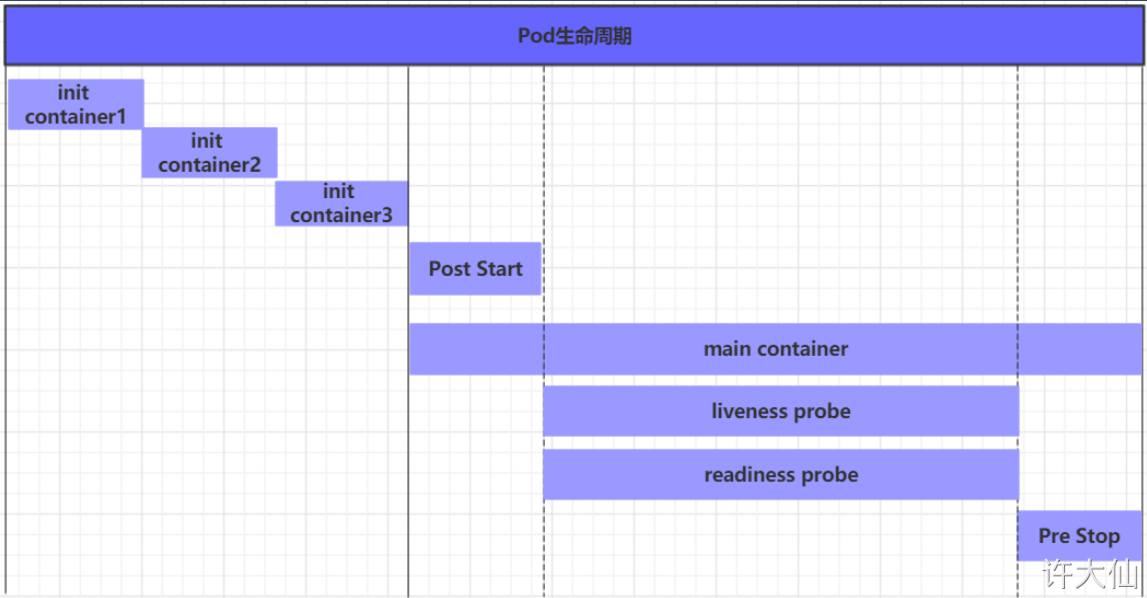
[root@master ~]# kubectl describe pods pod-initcontainer -n dev Name: pod-initcontainer Namespace: dev Priority: 0 Node: master/192.168.20.119 Start Time: Thu, 26 May 2022 04:58:23 +0000 Labels: user=xudaxian Annotations: <none> Status: Pending IP: 10.244.0.9 IPs: IP: 10.244.0.9 Init Containers: test-mysql: Container ID: docker://17eb2b7998b26557b75100f8ac6dc613b69a1e3113f9deaab18d7914b2b8881f Image: 192.168.20.119/library/busybox:latest Image ID: docker-pullable://192.168.20.119/library/busybox@sha256:2ca5e69e244d2da7368f7088ea3ad0653c3ce7aaccd0b8823d11b0d5de956002 Port: <none> Host Port: <none> Command: sh -c until ping 192.168.20.201 -c 1;do echo waiting for mysql ...;sleep 2;done; State: Running Started: Thu, 26 May 2022 04:58:24 +0000 Ready: False Restart Count: 0 Environment: <none> Mounts: /var/run/secrets/kubernetes.io/serviceaccount from default-token-7sxn4 (ro) test-redis: Container ID: Image: 192.168.20.119/library/busybox:latest Image ID: Port: <none> Host Port: <none> Command: sh -c until ping 192.168.20.202 -c 1;do echo waiting for redis ...;sleep 2;done; State: Waiting Reason: PodInitializing Ready: False Restart Count: 0 Environment: <none> Mounts: /var/run/secrets/kubernetes.io/serviceaccount from default-token-7sxn4 (ro) Containers: nginx: Container ID: Image: 192.168.20.119/library/nginx:latest Image ID: Port: 80/TCP Host Port: 0/TCP State: Waiting Reason: PodInitializing Ready: False Restart Count: 0 Limits: cpu: 2 memory: 10Gi Requests: cpu: 1 memory: 10Mi Environment: <none> Mounts: /var/run/secrets/kubernetes.io/serviceaccount from default-token-7sxn4 (ro) Conditions: Type Status Initialized False Ready False ContainersReady False PodScheduled True Volumes: default-token-7sxn4: Type: Secret (a volume populated by a Secret) SecretName: default-token-7sxn4 Optional: false QoS Class: Burstable Node-Selectors: <none> Tolerations: node.kubernetes.io/not-ready:NoExecute for 300s node.kubernetes.io/unreachable:NoExecute for 300s Events: Type Reason Age From Message
---- ------ ---- ---- -------
Normal Scheduled 30s default-scheduler Successfully assigned dev/pod-initcontainer to master Normal Pulling 29s kubelet, master Pulling image "192.168.20.119/library/busybox:latest" Normal Pulled 29s kubelet, master Successfully pulled image "192.168.20.119/library/busybox:latest" Normal Created 29s kubelet, master Created container test-mysql Normal Started 29s kubelet, master Started container test-mysql
发现pod卡在启动第一个初始化容器过程中,后面的容器不会运行
动态查看Pod:
1 2 3
[root@master ~]# kubectl get pods pod-initcontainer -o wide -n dev -w NAME READY STATUS RESTARTS AGE IP NODE NOMINATED NODE READINESS GATES pod-initcontainer 0/1 Init:0/2 0 4m48s 10.244.0.9 master <none> <none>
[root@master ~]# kubectl create -f pod-liveness-exec.yaml pod/pod-liveness-exec created [root@master ~]# kubectl describe pod pod-liveness-exec -n dev Name: pod-liveness-exec Namespace: dev Priority: 0 Node: node2/192.168.20.124 Start Time: Thu, 26 May 2022 05:22:10 +0000 Labels: user=xudaxian Annotations: <none> Status: Running IP: 10.244.1.6 IPs: IP: 10.244.1.6 Containers: nginx: Container ID: docker://b9a138a73f0e5137efdee4497ee710e9fd7f2ed25608577d0470c4b5a16c90fb Image: 192.168.20.119/library/nginx:latest Image ID: docker-pullable://192.168.20.119/library/nginx@sha256:416d511ffa63777489af47f250b70d1570e428b67666567085f2bece3571ad83 Port: 80/TCP Host Port: 0/TCP State: Waiting Reason: CrashLoopBackOff Last State: Terminated Reason: Completed Exit Code: 0 Started: Thu, 26 May 2022 05:25:17 +0000 Finished: Thu, 26 May 2022 05:25:47 +0000 Ready: False Restart Count: 5 Liveness: exec [/bin/cat /tmp/hello.txt] delay=0s timeout=1s period=10s #success=1 #failure=3 Environment: <none> Mounts: /var/run/secrets/kubernetes.io/serviceaccount from default-token-7sxn4 (ro) Conditions: Type Status Initialized True Ready False ContainersReady False PodScheduled True Volumes: default-token-7sxn4: Type: Secret (a volume populated by a Secret) SecretName: default-token-7sxn4 Optional: false QoS Class: BestEffort Node-Selectors: <none> Tolerations: node.kubernetes.io/not-ready:NoExecute for 300s node.kubernetes.io/unreachable:NoExecute for 300s Events: Type Reason Age From Message ---- ------ ---- ---- ------- Normal Scheduled 3m56s default-scheduler Successfully assigned dev/pod-liveness-exec to node2 Normal Pulled 2m29s (x4 over 3m55s) kubelet, node2 Container image "192.168.20.119/library/nginx:latest" already present on machine Normal Created 2m29s (x4 over 3m55s) kubelet, node2 Created container nginx Normal Started 2m29s (x4 over 3m55s) kubelet, node2 Started container nginx Normal Killing 2m29s (x3 over 3m29s) kubelet, node2 Container nginx failed liveness probe, will be restarted #容器 nginx 探测失败,将被重启 Warning Unhealthy 2m19s (x10 over 3m49s) kubelet, node2 Liveness probe failed: /bin/cat: /tmp/hello.txt: No such file or directory #找不到这个文件
观察上面的信息就会发现nginx容器启动之后就进行了健康检查。
检查失败之后,容器被kill掉,然后尝试进行重启,这是重启策略的作用。
稍等一会之后,再观察Pod的信息,就会看到RESTARTS不再是0,而是一直增长。
查看Pod信息:
1
2
3
[root@master ~]# kubectl get pods pod-liveness-exec -n dev -o wide NAME READY STATUS RESTARTS AGE IP NODE NOMINATED NODE READINESS GATES pod-liveness-exec 0/1 CrashLoopBackOff 6 7m23s 10.244.1.6 node2 <none> <none>
[root@master ~]# kubectl create -f pod-liveness-httpget.yaml pod/pod-liveness-httpget created [root@master ~]# kubectl describe pod pod-liveness-httpget -n dev Name: pod-liveness-httpget Namespace: dev Priority: 0 Node: node2/192.168.20.124 Start Time: Thu, 26 May 2022 05:38:43 +0000 Labels: user=xudaxian Annotations: <none> Status: Running IP: 10.244.1.8 IPs: IP: 10.244.1.8 Containers: nginx: Container ID: docker://477faf82ca2bffc2914f103b1c1d11c733c41c55c3ec0978c0b726a51fbf68bc Image: 192.168.20.119/library/nginx:latest Image ID: docker-pullable://192.168.20.119/library/nginx@sha256:416d511ffa63777489af47f250b70d1570e428b67666567085f2bece3571ad83 Port: 80/TCP Host Port: 0/TCP State: Running Started: Thu, 26 May 2022 05:38:44 +0000 Ready: True Restart Count: 0 Liveness: http-get http://127.0.0.1:80/hello delay=0s timeout=1s period=10s #success=1 #failure=3 Environment: <none> Mounts: /var/run/secrets/kubernetes.io/serviceaccount from default-token-7sxn4 (ro) Conditions: Type Status Initialized True Ready True ContainersReady True PodScheduled True Volumes: default-token-7sxn4: Type: Secret (a volume populated by a Secret) SecretName: default-token-7sxn4 Optional: false QoS Class: BestEffort Node-Selectors: <none> Tolerations: node.kubernetes.io/not-ready:NoExecute for 300s node.kubernetes.io/unreachable:NoExecute for 300s Events: Type Reason Age From Message
---- ------ ---- ---- -------
Normal Scheduled 15s default-scheduler Successfully assigned dev/pod-liveness-httpget to node2 Normal Pulled 14s kubelet, node2 Container image "192.168.20.119/library/nginx:latest" already present on machine Normal Created 14s kubelet, node2 Created container nginx Normal Started 14s kubelet, node2 Started container nginx Warning Unhealthy 6s kubelet, node2 Liveness probe failed: Get http://127.0.0.1:80/hello: dial tcp 127.0.0.1:80: connect: connection refused
查看Pod信息:
1 2 3
[root@master ~]# kubectl get pods pod-liveness-httpget -n dev
NAME                   READY   STATUS             RESTARTS   AGE
pod-liveness-httpget   0/1     CrashLoopBackOff   6          7m32s
[root@master ~]# kubectl explain pod.spec.containers.livenessProbe
KIND:     Pod
VERSION:  v1

RESOURCE: livenessProbe <Object>

DESCRIPTION:
     Periodic probe of container liveness. Container will be restarted if the
     probe fails. Cannot be updated. More info:
     https://kubernetes.io/docs/concepts/workloads/pods/pod-lifecycle#container-probes

     Probe describes a health check to be performed against a container to
     determine whether it is alive or ready to receive traffic.

FIELDS:
   exec <Object>
     One and only one of the following should be specified. Exec specifies the
     action to take.

   failureThreshold     <integer>
     Minimum consecutive failures for the probe to be considered failed after
     having succeeded. Defaults to 3. Minimum value is 1.

   httpGet      <Object>
     HTTPGet specifies the http request to perform.

   initialDelaySeconds  <integer>
     Number of seconds after the container has started before liveness probes
     are initiated. More info:
     https://kubernetes.io/docs/concepts/workloads/pods/pod-lifecycle#container-probes

   periodSeconds        <integer>
     How often (in seconds) to perform the probe. Default to 10 seconds. Minimum
     value is 1.

   successThreshold     <integer>
     Minimum consecutive successes for the probe to be considered successful
     after having failed. Defaults to 1. Must be 1 for liveness and startup.
     Minimum value is 1.

   tcpSocket    <Object>
     TCPSocket specifies an action involving a TCP port. TCP hooks not yet
     supported

   timeoutSeconds       <integer>
     Number of seconds after which the probe times out. Defaults to 1 second.
     Minimum value is 1. More info:
     https://kubernetes.io/docs/concepts/workloads/pods/pod-lifecycle#container-probes